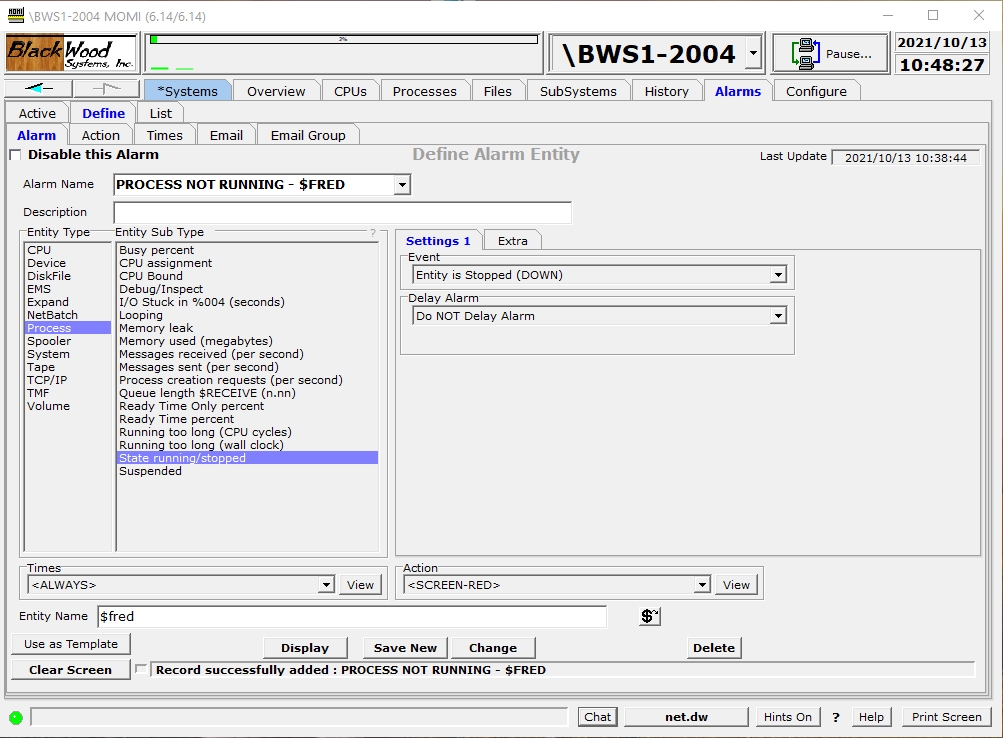
The Define / Alarm screen allows the creation and maintenance of alarms and the trigger threshold(s).
The field Disable this Alarm provides the ability to turn-off or prevent the processing of the record without deleting it.
The field Alarm Name is used to give the alarm a unique identification. This name appears on the Alarms / Active screen and should provide a general idea of what the alarm represents. Existing alarms are selected in the drop-down box.
The Alarm Name field may contain the characters [ ] to enclose text that will not display on the Alarms / Active screen. This may be used to cause the Alarm Name to appear more generic if needed. Examples:
Alarm Name What displays on Active Alarm
PROCESS - NOT RUNNING $FRED PROCESS - NOT RUNNING $FRED
PROCESS - NOT RUNNING [$FRED] PROCESS - NOT RUNNING
The Description field provides free form text to explain the nature of the definition.
The Entity Type column provides a list of general categories available. A selection is this column determines the contents of the Entity Sub Type column.
The Entity Sub Type column is a list of the alarm-able items under an Entity. A selection in this column determines the contents of events just to the right. Events are specific to each Sub Type. Place the mouse over events for additional information.
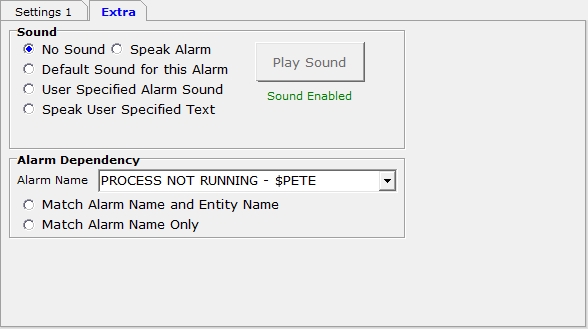
Under the Extra tab is the ability to associate sounds with an alarm or define a dependency.
A Sound may be played when an alarm is triggered. The available options are 1) speak the alarm, 2) a default or preselected message, 3) a user specified sound or 4) speak a user specified text string.
If this alarm would be redundant or not needed should another alarm already be triggered the Alarm Dependency may specify this relationship. Select the Alarm Name in the drop down box of an alarm that if active prevents this alarm from triggering. The match criteria may be either be only the Alarm Name or the Alarm Name plus the Entity Name (the Entity Name is the actual name of the particular item displayed in the alarm message such as $FRED, $LINE1, CPU 2, etc...). For example, suppose $FRED is started by $PETE. If $PETE is down showing an alarm about $FRED does not really help. As shown above, specify the alarm name for $PETE as a dependency to prevent the display of an alarm for $FRED.
The Times drop-down box selects when the alarm should be monitored. The default of <ALWAYS> means continuous monitoring.
The Action drop-down box selects what should occur in the event an alarm occurs. The default of <SCREEN-RED> means the Alarm appears on the Alarms / Active screen colored red.
The Entity Name field is used to enter CPU numbers, file, process names, etc...
An update (Change) or Disable this Alarm clears any of its alarms currently active.