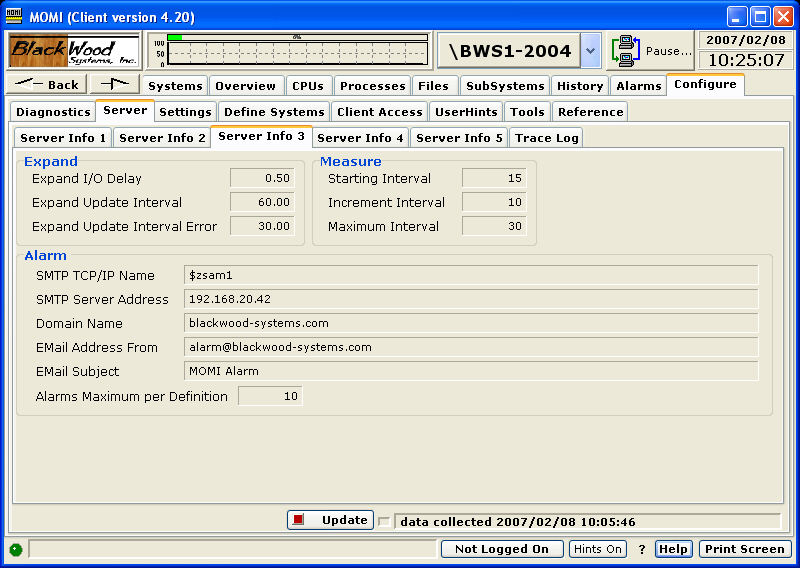
The Server / Server Info 3 screen presents and continues a variety of configuration information from the server perspective.
Place the mouse over the fields to obtain additional information. If the value is configurable, the tool-tip displays the CONFMOMI keyword.
The Expand section display timer values associated with MOMI collecting Expand information.
The Measure section displays timer values associated with the collection of MEASURE information for screens such as Files / Disk Entity.
The Alarm section displays information associated with resources available an configuration associate with Alarms for MOMI. See Alarm Overview for additional information.
The SMTP TCP/IP Name is the process used by MOMI for conversing with the SMTP server. This TCP/IP process definition is separate from the normal TCP/IP processes used by the MOMI server for listening for inbound connections from the MOMI PC Client. Defines the TCP/IP process name that the MOMI uses to access the SMTP server which MOMI uses to send EMAIL. SMTP is outbound email.
The SMTP Server Address defines the name or IP address of the SMTP server which MOMI uses to send EMAIL. This is the server MOMI uses to send outbound email. Note that the Tandem system must have the resolver active if a DNS-Name is used.
The Domain Name defines the users domain name which MOMI uses in alarm email. Specifying this keyword activates in the SMTP (i.e. outbound email) protocol the HELO protocol. Some outbound email servers may require the usage of this parameter in conjunction with SPAM detection.
The EMail Address From defines the return email address which MOMI used in alarm email. This email address should be valid monitored address so that problems in sending email or replies from users receiving email are seen.
The Email Subject has three possibilities:
If the keyword is not present, the default subject reads: MOMI Alarm
Use the keyword and specify a subject line.
Use the keyword but and specify and empty double quote (i.e. ""). This causes the first line of the alarm message to appear as the subject (in other words the "fixed subject" is eliminated).