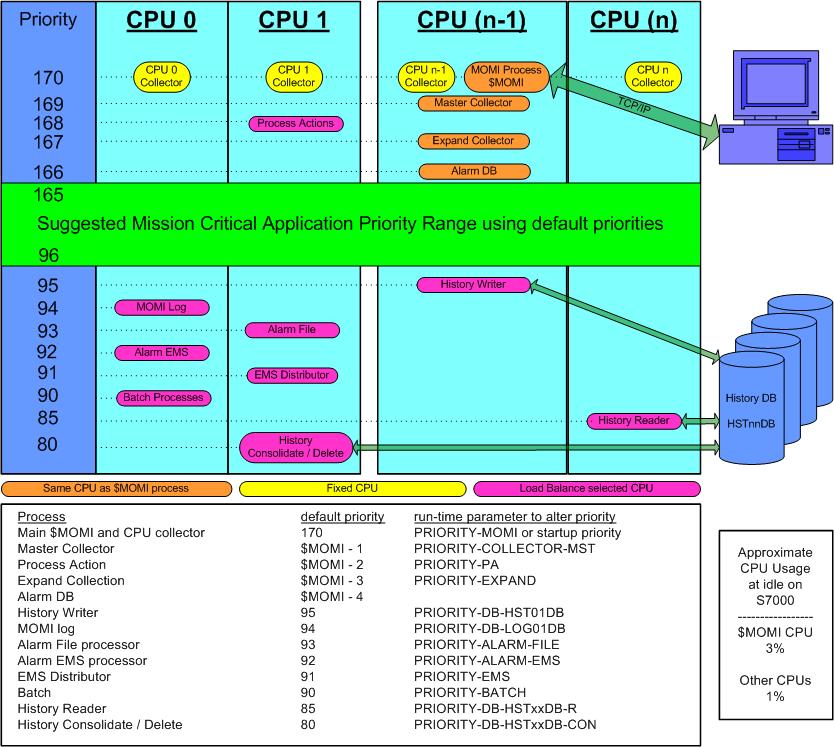
In order for MOMI to collect information on a continuing basis, MOMI must run at a priority high enough that its main operation of collecting information and reporting to Clients is allowed to function on a timely basis.
MOMI, to better divide its operations, starts several copies of itself. The main program $MOMI, is the master traffic cop, data collector and data reporter. MOMI also starts a copy of itself in every CPU in order to collect information about that CPU. All information collected is reported back to $MOMI. $MOMI and the CPU collectors consume a fairly consistent portion of CPU resources, with $MOMI varying the most, based on incoming requests from the PC Clients.
By default, $MOMI and the collectors in each CPU run at a rather high priority of 170. This priority is set in the OBYMOMI file.
MOMI also starts other processes based on needs of the PC Client. These demand based programs run at default priorities in the 80 to 95 range. These priorities can be adjusted in the CONFMOMI file.
If you have concerns with the priority, we suggest running $MOMI at a lower priority than your production critical programs. Note that during this time it is possible the timely collection and reporting of data will be interrupted from time-to-time. This will primarily show up as MOMI CPU collectors reporting as HUNG or STOP in the MOMI PC Client Overview screen. Once you have tested and are comfortable with the operation of MOMI on your system, then MOMI should run at a rather high priority. This insures the consistent collection and reporting of information.